AdvancedTween Editor
Using the AdvancedTween Editor in full-screen mode is recommended.
About the AdvancedTween Editor and AdvancedTween Extension
The AdvancedTween Editor and the AdvancedTween extension provide animation creation tools and playback functionality for GDevelop.
⚡ Changes from version 1.2.0
The AdvancedTween Editor has undergone major changes in version 1.2.0.
It now supports multiple objects, and the new “Save All” button allows you to save the entire project as a .atproj file.
This .atproj file is intended for use within the Editor. By loading it with the “Load All” button, you can restore the entire project. (In other words, this file is not used in GDevelop.)
Please note that the .json files used in GDevelop must now be exported per object using the “Save JSON” button on the timeline.
Additionally, the .atproj file includes image data for preview purposes. These images are only for preview and cannot be exported. Please use the original image files in GDevelop.
The following video demonstrates how to use an older version. Please note that the interface is different from the current one.
Please note that these tools are not intended for creating image-changing animations.
In other words, they are not intended as a replacement for Spine.
🚀 Possible Future Features
- [Completed]
Support for multiple objects (editor only) - Event keyframes
- Color tinting
- Retrieving animation names (behavior only)
📝 AdvancedTween Editor
The AdvancedTween Editor is a browser-based timeline animation editor that supports creating and editing animations.
You can animate the following object properties:
Continuous Properties
Values change smoothly between keyframes.
The speed and feel of the transition vary depending on the selected easing type.
- Position (relative)
- Z-index (relative)
- Angle (relative)
- Size (relative)
- Opacity (supported objects only)
Properties marked as “relative” are treated as relative values based on the property values at the moment playback starts.
Discrete Properties
Regardless of the easing setting, these properties are always handled using step interpolation.
- Visibility (show / hide)
- Flipping (supported objects only)
- Animation name (sprites only)
About Easing
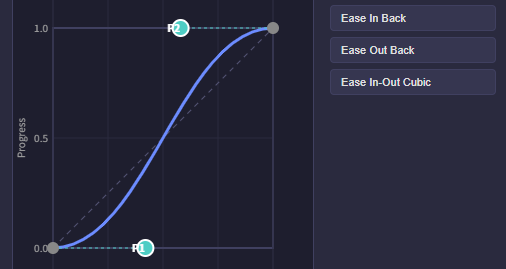
"linear"— Changes at a constant speed"cubicBezier"— Changes with acceleration and deceleration using a cubic Bézier curve"step"— Holds the value until the next keyframe, then switches instantly
For "cubicBezier", you can either choose from presets or directly edit the Bézier curve within the editor.
How to use the Copy AI Prompt Button
The Copy AI Prompt button copies a prompt to your clipboard that instructs AI assistants (ChatGPT, Gemini, Copilot, GDevelop Ask AI, etc.) how to create animation JSON files.
Paste the prompt into your preferred AI chat and send it. Describe the animation you want, and the AI will generate the JSON for you. (Multi-language supported – use your preferred language)
Copy the completed JSON and import it into the editor using Load JSON → From Clipboard.
🧩 AdvancedTween Extension
The AdvancedTween extension provides behaviors that allow animations created in the AdvancedTween Editor to be played in GDevelop.
By adding the AdvancedTween behavior to a 2D object and loading a JSON file created with the editor, the animation will be played.
Notes on Sprite Object Points
It is recommended that the sprite’s origin point and center point are placed at the same position.
If the origin and center differ, the animation may produce unexpected results.
About Relative Object Properties
Some properties are handled as relative values based on their values at the moment playback starts.
For example, if you switch to another animation after an animation that changes the object’s size, the modified size will be retained.
If you want to avoid this behavior, make sure to set the property to the desired value before switching to the next animation.
📁 About the example project file
The example project file contains the following scenes:
- Basic example
- Controlling animation
- Platformer example
- Game title example [v1.2.0]
🍩 Donation
If you like this extension, please consider purchasing the sample project files to support my ongoing development and maintenance. (The sample project files will definitely be useful for you 😉)
If you’re interested in members-only early access, please check here.

Download
Click download now to get access to the following files:
Development log
Comments
Log in with itch.io to leave a comment.
Great!
Great tool!
Would it be on android